Templot Club Archive 2007-2020
|
|||
| author | remove search highlighting | ||
|---|---|---|---|
|
posted: 30 Jan 2010 22:50 from: Paul Boyd
click the date to link to this post click member name to view archived images |
HI Martin (If my previous post on this subject turns up, I don't know what happened!) Anyway, I just reloaded a previously saved shape file that contained one bitmap, one rectangle and one line, and got the following: 105_301735_260000000.png 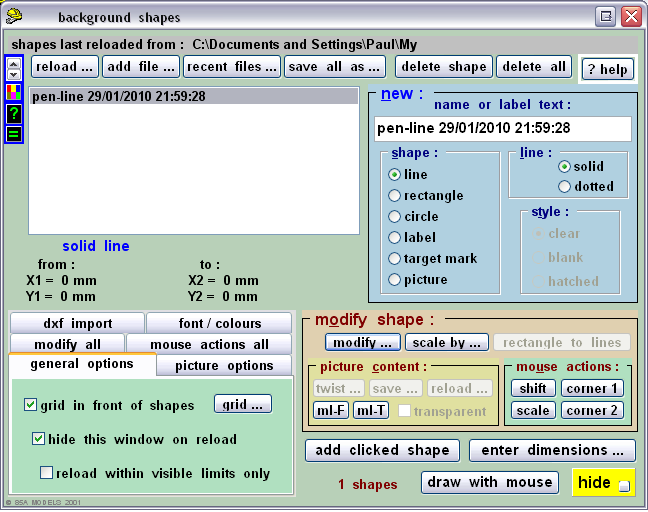 That description isn't anything I would enter, and the timestamp is about 15 minutes earlier than the file timestamp. Look at the coordinates - that line is going nowhere! Any ideas what might have happened? I can't think of anything I was doing differently, and the file was saved by overwriting the previous file (I usually do this for shape files). Fortunately this particular shape file won't be difficult to recreate! |
||
|
posted: 31 Jan 2010 02:42 from: Martin Wynne
click the date to link to this post click member name to view archived images |
Hi Paul, Thanks for the report. A "pen-line" background shape is created when using the draw function with the spacing-ring tool. If you haven't moved the spacing-ring you will get a pen-line from 0 to 0. So you can create exactly that shapes file instead of the one you thought you had, by doing this: 1. If the Background Shapes dialog is open you can delete all by pressing A on the keyboard, followed by ENTER twice -- on the confirm dialog, and then on the Save dialog. 2. If the spacing-ring dialog is open ( click tools > spacing-ring menu item), click the draw to ring button or press A on the keyboard. Notice that both use the same keyboard accelerator key (A), so if you have a stuck key, or a series of As and Enters waiting in the Windows keyboard queue after leaning on the keyboard  , it's possible to imagine the above sequence happening in quick succession without your being aware of it. If you then do a Save again and overwrite your previous file, you would get the result you found. , it's possible to imagine the above sequence happening in quick succession without your being aware of it. If you then do a Save again and overwrite your previous file, you would get the result you found.I've no idea if any of this happened of course. If it did happen, it illustrates the folly of the basic Windows scheme where a Save overwrites the previous file. You can never be entirely sure that you are not deleting something useful and replacing it with rubbish. Which is why by default Templot never does that. If you had not done that, you would still have your original file. On the other hand, the file location showing in the screenshot seems a bit odd -- C:/Documents and Settings/Paul/My Do you really have a folder called "My", and do you use it for your Templot stuff? If not, it seems something strange is happening. And why isn't the .bgs file name showing? If you adopt my method of always using all upper case for folder names, and all lower case for file names, you would know whether "My" is a folder or a file. In Windows Vista and Windows 7, there are restrictions on where a program can save its data. But to keep older programs working, Windows "pretends" to put it in one place while actually putting it somewhere else. This can be a nightmare when trying to find files which have apparently gone missing. Any folder beginning "My ..." needs to be treated with great caution -- it may not actually exist, it may not be where you thought it was, and any files listed in it may actually be somewhere else.  Which means Templot may have got confused in trying to display the full path to the file. My instinct is to completely ignore all this Windows nonsense. If you save your files in the Templot default location, i.e. with Templot itself at C:/TEMPLOT/SHAPE-FILES/ , or in any folder you create yourself well away from the Windows folders, you won't have any such problems. regards, Martin. |
||
|
posted: 31 Jan 2010 14:00 from: Paul Boyd
click the date to link to this post click member name to view archived images |
Hi Martin Thanks for your reply. That confused me though - I've never knowingly used the spacing ring! In any case, surely the use of the spacing ring wouldn't replace shapes that are already loaded? (Assuming I had some shapes loaded, maybe I didn't) Now I know what the pen-line shape is, I'll have a play and see if I can recreate the "problem". And you have to admit that that particular series of accidental key presses is somewhat unlikely, isn't it, especially considering the positions of the A end Enter keys? If it did happen, it illustrates the folly of the basic Windows scheme where a Save overwrites the previous file. You can never be entirely sure that you are not deleting something useful and replacing it with rubbish. Which is why by default Templot never does that. If you had not done that, you would still have your original file.Within Templot, I only do this for shapes files, and only simple ones at that! It took less than two minutes to recreate the lost one. For box files, the default Templot file behaviour has been a life saver! Nope - I don't have a folder or file called "My" - my default Templot installation is within My Documents because that's where I like it and it's been there for about 9 years without any problems! I don't like installing programs in root - not sure why but it might be an ancient Unix hangover, maybe. The file location has always shown the abbreviated name for as long as I can remember. As this is XP, the folders are where they say they are - I got very confused when I first used Vista because folders weren't where they said they were! |
||
|
posted: 31 Jan 2010 15:07 from: Martin Wynne
click the date to link to this post click member name to view archived images |
Paul Boyd wrote: And you have to admit that that particular series of accidental key presses is somewhat unlikely, isn't it, especially considering the positions of the A end Enter keys?Hi Paul, I agree, but otherwise I can't see any way that the effect you saw could have happened.  Nope - I don't have a folder or file called "My" - my default Templot installation is within My Documents because that's where I like it and it's been there for about 9 years without any problems! Please don't install Templot there or in the C:/Program Files/ folder. It might work in XP, but Templot won't work there in Vista or Windows 7. If you don't like putting Templot directly in the C drive root as in the default install (although I don't know any reason not to), please create a structure something like E:/PAUL_STUFF/RAILWAY/MODELS/TEMPLOT/ or whatever you want. Templot will work happily there, but not if you put it in any of the Windows folders. Remember to use the same location when installing Pug upgrades. The file location has always shown the abbreviated name for as long as I can remember.It's because there is a space in the folder name. Believe it or not, there are still some low-level routines in Windows which choke on file or folder names containing spaces. Even when they are Windows own folders. The dreaded HTML Help Viewer for CHM files being one of them. Always replace spaces with underscores when creating file and folder names, if you want a quiet life. regards, Martin. |
||
|
posted: 31 Jan 2010 19:01 from: John Lewis
click the date to link to this post click member name to view archived images |
Martin wrote: If you don't like putting Templot directly in the C drive root as in the default install (although I don't know any reason not to), please create a structure something like E:/PAUL_STUFF/RAILWAY/MODELS/TEMPLOT/ or whatever you want. Templot will work happily there, but not if you put it in any of the Windows folders. Martin I have put my copy of Templot in F:\DataJHL\Templot1C which works fine under XP. From what you say this will work OK under Windows 7 should I have to upgrade my PC? My reason for putting Templot in this location is that this drive (partition) is backed up on a daily basis, whereas my C:\ drive is not (but it does not have my data = work in progress there). |
||
|
posted: 31 Jan 2010 19:22 from: Paul Boyd
click the date to link to this post click member name to view archived images |
Hi Martin On my Vista laptop, I've installed Templot in C:\Users\Paul\Documents. It works perfectly! (No spaces - perhaps MS realised that spaces killed some of their own software.) If I do run into any file-related problems though, I will bear in mind your plea not to install it where I've installed it Mind you, I'm leaning towards pushing a lot of stuff onto the second drive anyway. That drive is currently used for video capture, but I'm running out of VHS to capture (thankfully!) ...which happens to be my E: drive...Remember to use the same location when installing Pug upgrades.Promises, promises  |
||
|
posted: 31 Jan 2010 20:57 from: Martin Wynne
click the date to link to this post click member name to view archived images |
John Lewis wrote: I have put my copy of Templot in F:/DataJHL/Templot/091C which works fine under XP. From what you say this will work OK under Windows 7 should I have to upgrade my PC?Hi John, Yes, that should still be working fine after changing your version of Windows. You may need to create a new desktop shortcut for it, and you will very likely need a new lock-release code. regards, Martin. |
||
|
posted: 31 Jan 2010 21:02 from: Martin Wynne
click the date to link to this post click member name to view archived images |
Paul Boyd wrote: On my Vista laptop, I've installed Templot in C:/Users/Paul/Documents/. It works perfectly!Hi Paul, I'm really surprised that Vista lets you run an executable file from a documents folder. But we all know that Mr Gates moves in mysterious ways, his wonders to perform. If you do run into trouble, the first thing I would do is to move Templot to a folder not owned by Windows. regards, Martin. |
||
|
posted: 1 Feb 2010 00:30 from: Glen Suckling
click the date to link to this post click member name to view archived images |
Martin Wynne wrote:
Hi Martin, I have several compiled dBASE executable files (*.exe) that are scattered over my computer. I tend to put them wherever the data files that they use reside which is mostly in documents folders. I have had no trouble using them in XP or Vista. I have recently upgraded to Windows 7 and so far I have had no problems. Like you I put my larger applications in the C: drive root which is also where I keep all of my source code files. I just drop the resulting executables in with the data. It makes no sense and it may just be my imagination but programs do seem to run faster out of the root as long as they can find their data files. Glen |
||
|
posted: 1 Feb 2010 18:05 from: Paul Boyd
click the date to link to this post click member name to view archived images |
Hi MartinI'm really surprised that Vista lets you run an executable file from a documents folder.Ah, well, y'see, I didn't know there might be a problem with executables there, and it's the not knowing that makes it work I just wish Vista wouldn't nag me every time I want to do something vaguely techy. I know that the nag box can be turned off, but then I get nagged that the nag box is turned off! It's quite happy running a program that hasn't been Microsoft certified from somewhere it shouldn't be running from though... |
||
|
posted: 1 Feb 2010 18:15 from: Dave Summers
click the date to link to this post click member name to view archived images |
Paul - The answer lies at Disable User Account Control. I use W7 and the fix is even easier than Vista. Cheers Dave |
||

| Please read this important note about copyright: Unless stated otherwise, all the files submitted to this web site are copyright and the property of the respective contributor. You are welcome to use them for your own personal non-commercial purposes, and in your messages on this web site. If you want to publish any of this material elsewhere or use it commercially, you must first obtain the owner's permission to do so. |