Templot Club Archive 2007-2020
|
|||
| author | remove search highlighting | ||
|---|---|---|---|
|
posted: 26 Jun 2010 14:24 from: stuart1600
click the date to link to this post click member name to view archived images |
It would be really useful if the setting for minimum radius was saved with the file. If you forget to re-set it when you open a file then the warning in the information box becomes ineffective. If there is some insurmountable obstacle to doing this, then could I suggest that in 32mm finescale (G0G-F) the pre-set minimum be changed to 1830mm (approx. 6ft) - the current setting of 1200mm seems very low. |
||
|
posted: 26 Jun 2010 14:41 from: Martin Wynne
click the date to link to this post click member name to view archived images |
stuart1600 wrote: It would be really useful if the setting for minimum radius was saved with the file.Hi Stuart, It is saved.  The minimum radius setting is specific to each template. You don't usually want the same limit for the whole layout. For example when designing the gas works sidings you would probably accept a sharper radius than for the main running lines. If you change the radius setting and then store the template, the radius setting for that template is stored with it. When you reload the file and copy that template to the control, the radius setting is restored. So to carry on where you left off, just copy the relevant template to the control template before continuing with the next part of the design. Alternatively, you can store library templates with your various settings for this and other options, and copy the required one of those as needed. This is the standard way to use Templot -- copy from a template which contains the desired set of settings, and then adjust it as required for the new work. regards, Martin. |
||
|
posted: 27 Jun 2010 10:41 from: stuart1600
click the date to link to this post click member name to view archived images |
Thanks for the quick response, Martin. I had obviously misunderstood the minimum radius setting, thinking it related to a box-file rather than a template. I may well be in a minority of one (not for the first time!)but setting a minimum radius for the whole layout is actually what I would prefer to do. If the entire layout was the gasworks sidings then obviously a sharper radius would be appropriate, but for any typical mainline/branchline layout then the long-established "6ft radius for 0-gauge" seems more useful. But, the even more interesting point you make in your reply is about using standard templates from a library, for which the minimum radius would already be set. I have not made use of the library facility in Templot, but I can see how this would be a much more sensible way of working than creating "new" templates for each piece of track. Clearly I need to play around with Templot's full potential. Thanks again for getting back so quickly, and for opening my eyes to better ways of using Templot. Kind regards, Stuart |
||
|
posted: 5 Mar 2013 21:08 from: Paul Boyd
click the date to link to this post click member name to view archived images |
Hi Martin Sorry to resurrect this old thread, but it popped up when searching for exactly the same thing as Stuart was asking! I understand the reasons for not usually wanting the same radius limit throughout a layout, and sometimes do that myself, but it would be handy if there was a way of changing the radius limit for a group of templates instead of one at a time. That way, it would be possible to change it for the whole layout if wanted, but perhaps more useful to change selected lumps of it (the gas works siding!) This came up as I'm playing with a layout from 2004, and the radius limit set then (where it's set at all!) is no longer suitable. Or more simply, I just changed my mind after 8½ years! (Edit - maths never was my strong point!) Food for thought, or a distraction from writing the user guide?  |
||
| Last edited on 5 Mar 2013 21:10 by Paul Boyd |
|||
|
posted: 5 Mar 2013 22:58 from: Martin Wynne
click the date to link to this post click member name to view archived images |
Paul Boyd wrote:Food for thought, or a distraction from writing the user guide?Hi Paul, User Guide? Oh yes, the User Guide ... ...  You have drawn my attention to the fact that this item is in the wrong menu: 2_051751_580000000.png 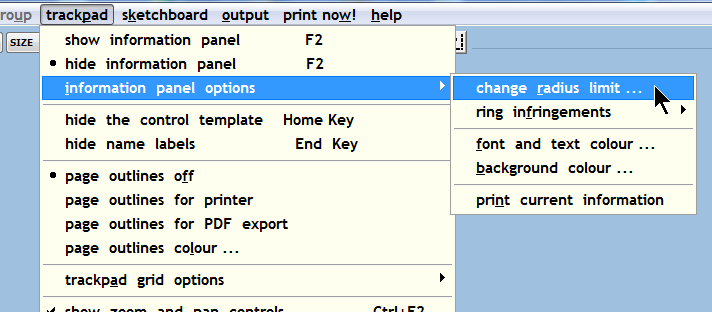 That setting is template-specific, so it shouldn't be in the trackpad menu. It's been there for only 14 years, so hopefully no-one noticed. I will move it to the geometry menu and add an option to modify group to match. Thanks for reporting this.  regards, Martin. |
||
|
posted: 6 Mar 2013 12:12 from: Paul Boyd
click the date to link to this post click member name to view archived images |
Hi Martin Thanks! I'd always put the odd menu location for that item down to one of Templot's quirks |
||
|
posted: 5 Apr 2013 13:03 from: Martin Wynne
click the date to link to this post click member name to view archived images |
Martin Wynne wrote:I will move it to the geometry menu and add an option to modify group to match.Hi Paul, In the next program update shortly: 2_050756_480000001.png 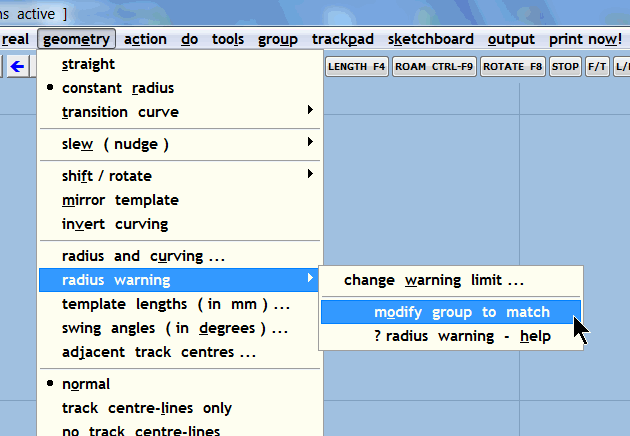 2_050756_460000000.png 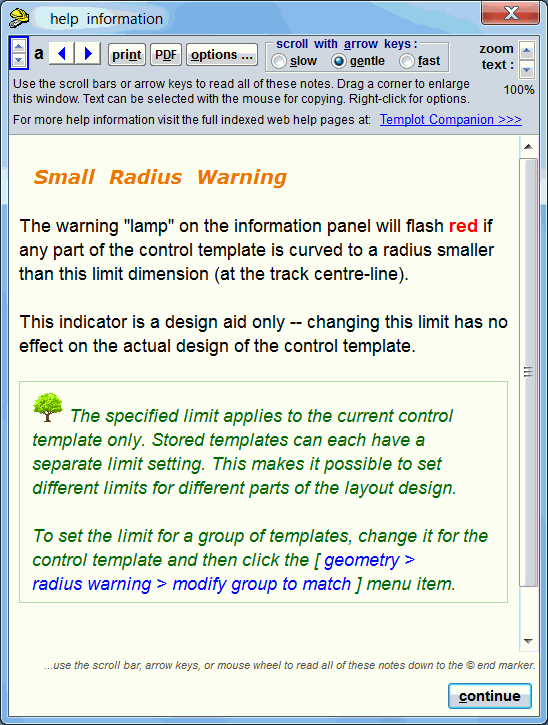 2_050823_150000000.png 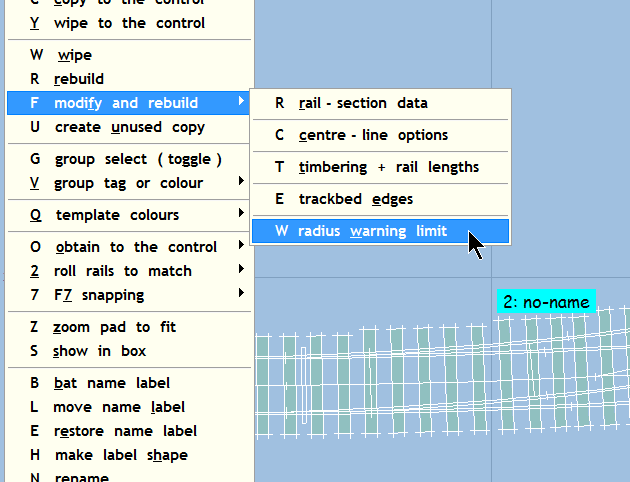 regards, Martin. |
||
|
posted: 5 Apr 2013 18:35 from: Paul Boyd
click the date to link to this post click member name to view archived images |
Thanks, Martin, that will be really useful. Looking forward to the next release! | ||

| Please read this important note about copyright: Unless stated otherwise, all the files submitted to this web site are copyright and the property of the respective contributor. You are welcome to use them for your own personal non-commercial purposes, and in your messages on this web site. If you want to publish any of this material elsewhere or use it commercially, you must first obtain the owner's permission to do so. |