Templot Club Archive 2007-2020
|
|||
| author | remove search highlighting | ||
|---|---|---|---|
|
posted: 30 May 2009 14:38 from: Martin Wynne
click the date to link to this post click member name to view archived images |
Dear all, Nowadays for 3D visualisation and walk-throughs of Templot tracks in your layout design, the obvious choice is Google Sketchup . But if you are looking for a more conventional CAD for use with Templot's DXF exports, a very powerful 2D/3D CAD package which is entirely free* is: ProgeCAD 2008 SMART (Proge is in Italy) It's based on the IntelliCad engine and uses AutoCad DWG/DXF as its native file format, so loading DXF exports from Templot is simple. Bearing in mind the cost of other full-featured CAD packages, this entirely free version is excellent and much more powerful than the other free and low-cost CAD programs available. There are some nag screens about upgrading to the Professional version when you first select several functions, but they all have "don't show this again" buttons -- so you are soon rid of them.  *Free for personal / non-commercial use only. Donations invited to http://www.doctorswithoutborders.org regards, Martin. |
||
|
posted: 30 May 2009 14:41 from: Martin Wynne
click the date to link to this post click member name to view archived images |
Another very capable free CAD program is: free version of DoubleCAD . DoubleCAD is from the makers of TurboCad, and is intended to be a direct replacement for AutoCad LT. I don't know AutoCad and I'm very happy with TurboCad. But if you know AutoCad and want a free program using the same interface for use with Templot's exported DXF files, DoubleCAD looks to be ideal. regards, Martin. |
||
|
posted: 11 Oct 2009 14:59 from: Jonathan Wells click the date to link to this post click member name to view archived images |
A couple of days ago I downloaded and installed the free version of Google Sketchup which is version 7.1 and discovered that it DOES NOT import or export DXF files!! You need to install and pay for the Pro version to be able to import and export DXF files!  I do have TurboCad 8 on my machine and might try one of the others mentioned above. |
||
| Last edited on 11 Oct 2009 15:00 by Jonathan Wells |
|||
|
posted: 11 Oct 2009 21:23 from: Martin Wynne
click the date to link to this post click member name to view archived images |
Jonathan Wells wrote: A couple of days ago I downloaded and installed the free version of Google Sketchup which is version 7.1 and discovered that it DOES NOT import or export DXF files!! You need to install and pay for the Pro version to be able to import and export DXF files!Hi Jonathan, Is this a change in version 7 ? My copy of Google Sketchup 6.4 certainly imports DXF files, here is the evidence: 2_111618_560000000.png 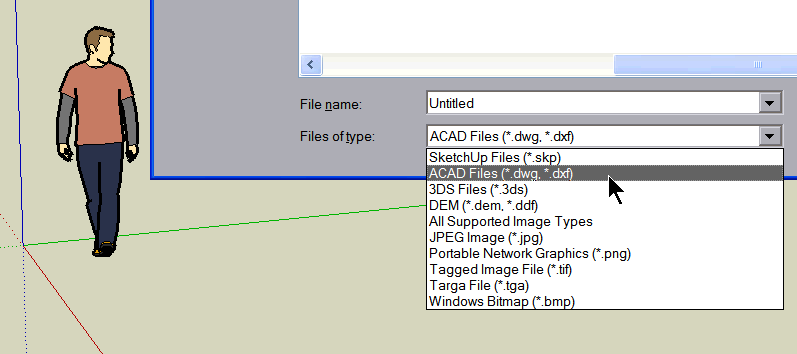 Note that this file dialog is accessed via File > Import... , not File > Open . However, there is no DXF export function. regards, Martin. |
||
|
posted: 11 Oct 2009 22:45 from: Paul Whitaker
click the date to link to this post click member name to view archived images |
Martin Wynne wrote:Is this a change in version 7 ? Google have removed DWG/DXF import from Sketchup 7.1. They are still providing this functionality via a downloadable plugin, but only for a "limited" time, and not for any future major versions: http://sketchup.google.com/support/bin/answer.py?answer=161784 |
||
|
posted: 12 Oct 2009 14:08 from: Jonathan Wells click the date to link to this post click member name to view archived images |
Thanks, Paul, for that pointer! I have just downloaded this plug-in and it works. It's not clear what Google mean by "limited time" - does that mean the plug-in will not be available later or does that mean the plug-in will only work on my machine for so long? I have just downloaded this plug-in and it works. It's not clear what Google mean by "limited time" - does that mean the plug-in will not be available later or does that mean the plug-in will only work on my machine for so long?Conclusion - Sketchup can no longer be recommended as a free 3D CAD software to be used in conjunction with Templot. |
||
|
posted: 12 Oct 2009 18:47 from: Bill_Lobb
click the date to link to this post click member name to view archived images |
Jonathan Wells wrote: Thanks, Paul, for that pointer!Just a thought. Could you load the dxf into (say) Progecad, save it as a dwg and then load that into Sketchup? I've no experience of any of this, so it might be total rubbish. Bill |
||
|
posted: 17 Nov 2009 18:21 from: Paul Boyd
click the date to link to this post click member name to view archived images |
Jonathan Wells wrote:I have just downloaded this plug-in and it works. It's not clear what Google mean by "limited time" - does that mean the plug-in will not be available later or does that mean the plug-in will only work on my machine for so long?The way I read it (and it is certainly ambiguous) is that whilst version 7 is still the current version, this plug-in will be available. As soon as the next release comes along, that plug-in will be removed from the website and will also no longer be supported in the newer version. This basically means (if I have it right) that we're stuck with v7 if we want to import DXFs! I think I'll stick with this though, and that's basically because if I want a commercial Pro license for work, I'd better learn how to use it! (Oh yeah - I just found this thread when thinking "Where's the DXF import gone?". Thanks to Paul W for the link to the plug-in.) |
||

| Please read this important note about copyright: Unless stated otherwise, all the files submitted to this web site are copyright and the property of the respective contributor. You are welcome to use them for your own personal non-commercial purposes, and in your messages on this web site. If you want to publish any of this material elsewhere or use it commercially, you must first obtain the owner's permission to do so. |